Blog
Protected: Archive data!
Tips on creating movies in Matlab
To those of you who are interested in enhancing the way you present data using Matlab, possible avenues include changing the viewpoint specification (i.e. the elevation and azimuth) of the figure or creating a movie (or both). The following is a simple example to demonstrate how to accomplish both changing the view of the figure while simultaneously creating a video of the process.
In my current research I am investigating atmospheric temperature disturbances and the data set I am using involves 37 (2D) layers of the atmosphere. When discussing my work with colleagues it is important to properly explain what is happening at each atmospheric layer. A good way to do this is to create a movie that starts with the lowest atmospheric layer (surface level) and build an atmospheric profile by adding more layers one at a time. Here is some pseuo Matlab code to help perform this task:
(Note that each number from 1-19 represents the equivalent line number of code)
- j=0; %This is the atmospheric layer number, which could also represent height
- for i = 1:37 %This will iterate through each of the 37 layers
- h= plot(data(i)); %Plot the data associated with the i-th layer
- z = get(h,’ZData’,) + j; %This will specify the placement of the 2D plot on a z-axis
- set(h,’ZData’,z); %Set the data at the current iteration to the specified height
- j=j+1;
- view(0,50); %This will change the view of the data, where the first number represents the azimuth and the second is the elevation
- drawnow %Display the current iteration’s plot
- videoframe(j) = getframe(gcf); %This will store the current frame to the j-th element of the filename ‘videoframe’
- end
- for i = 1:360 %Next let’s rotate the atmospheric column 360 degrees
- view=(i,50) %At each iteration we change the azimuth while keeping height the same
- drawnow
- j=37+i; %Be careful not to overwrite any of the past frames
- videoframe(j) = getframe(gcf);
- end
- my_video = VideoWriter(‘video_name.avi’); %Call the video writer function and specify the name of the video and format
- open(my_video);
- writeVideo(my_video,videoframe); %Write your video frames stored in ‘videoframe’ to ‘video_name.avi’
After running this code with your own data you should have an AVI movie that builds a 37 layer atmospheric profile and then rotates the image around 360 degrees. If you find the video runs too quickly try adding more video frames at each iteration.
If you have any further questions please don’t hesitate to ask.
Happy plotting!
GCM history
I came across this interesting website about the history of General Circulation Models:
http://pne.people.si.umich.edu/sloan/mainpage.html
While reading it, I recalled a personal account of the early development at Princeton/GFDL by its first director, Joseph Smagorinsky, as (earliest) part of the story:
https://www.dropbox.com/s/u3mv79u2jvz4s80/smargorinsky1983advGeophys_beginning_NWP.pdf?dl=0
CSA proposal funded
Our proposal to study atmospheric water vapor is funded by the Canadian Space Agency. In this project we will use satellite data to study the water budget in the climatically very important UTLS region. A new postdoc is WANTED for this research (see the ad below); prospective graduate students interested in the topic are equally welcome to join this research!
Postdoctoral Fellow Position in Satellite Data Analysis and Atmospheric Modeling
We seek a postdoctoral fellow to analyze satellite data and conduct numerical simulations for understanding atmospheric water vapor distribution and variation in the upper-troposphere and lower-stratosphere region.
Required qualifications include:
PhD in Atmospheric Sciences or a relevant physical science discipline (e.g., Meteorology, Physics, Computational Fluid Dynamics, etc.); and
Experience of scientific computing and capability of running high-resolution atmospheric dynamics models such as WRF and transport model such as HYSPLIT.
Desirable qualifications:
Experience of satellite data analysis; and
Knowledge of radiative transfer and cloud physics.
The initial appointment will be for one year, renewable contingent on satisfactory performance and funding availability. Interested candidates should contact Professor Yi Huang (yi.huang@mcgill.ca) by email, enclosing a curriculum vitae, transcripts of academic records, and names and contacts of at least two references.
Jing won CMOS Award
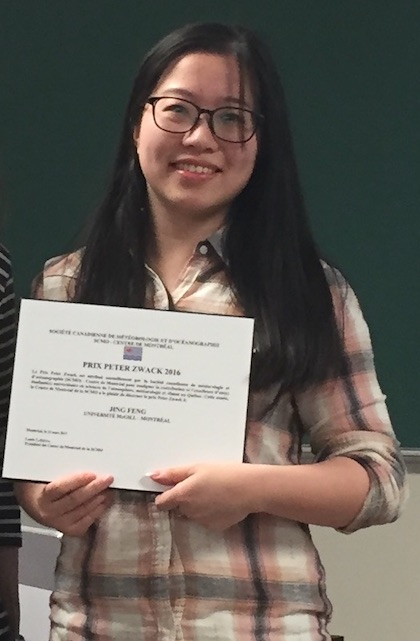
Jing Feng is presented the 2016 CMOS Peter Zwack Award today for her excellent academic performance during her MSc; she has now fast-tracked to PhD. Congratulations to Jing!
Kevin awarded Canada Graduate Scholarship!
Congratulations to Kevin Bloxam for winning a Canada Graduate Scholarship for MSc awarded by NSERC! Kevin has worked on the radiative damping process in the atmosphere.
Gina and Benjamin won NSERC USRA!
Gina Chou and Benjamin Vennes both won the 2017 NSERC Undergraduate Student Research Award (USRA). Gina will work on Arctic radiative feedback and Benjamin will research air pollution-meteorology relation. Congratulations to both of them!
 AtmRad @ McGill